File ingestion allows ChatGPT to directly read, analyze, and reason over files you upload, turning static documents into sources of insight. When you upload a file (such as a PDF, DOCX, CSV, XLSX, or TXT), ChatGPT temporarily ingests the contents, storing them in the active memory for that conversation. You can then ask questions, request summaries, extract data, or perform analysis directly against the file.
This is especially powerful for working with:
- Long or complex documents
- Spreadsheets and structured data
- Reports, contracts, or policies
- Research papers or transcripts
How to use file ingestion
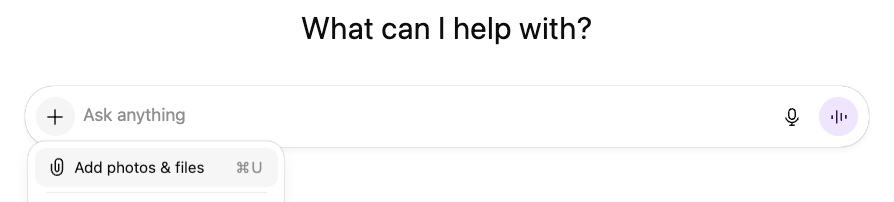
Press the “+” button in the “Ask anything” box, and select “Add photos & files.” Then upload the file you want to attach.
Prompting Best Practices
- Use the DIRECT framework to guide you. Upload the file as an attachment, and specify what in the file you want ChatGPT to focus on in the “Information” section of your prompt.
- Ask ChatGPT to “Synthesize” a document.
- Upload a spreadsheet, for example a CSV, with a mix of qualitative and quantitative information, and ask ChatGPT to help you understand and visualize the data.
- Compare and contrast two documents.
- Analyze sentiment or tone in a document.
- Apply a framework or rubric from one document to the contents of another.
- Ask ChatGPT to “Transform” a document.
- Upload a complicated research paper and ask ChatGPT to provide a simple summary.
- Upload a powerpoint presentation and ask ChatGPT for feedback on the content.
- Summarize a document in simple terms.
- Rewrite a short document in a particular style.
- Turn a presentation into a document.
- Ask ChatGPT to “Extract” information from a document.
- Upload a PDF and have ChatGPT find any references to a certain topic.
- Pull out relevant quotes from a document.
- Search for any mention of a particular topic from a document or spreadsheet.
- Extract metadata (author, creation date, etc.) from a document.
- Count the number of rows in a spreadsheet that contain a certain attribute
- Extract specific sections of a document (e.g., all headings or all bullet-point lists).
Technical Details
File Types
All common file extensions for text files, spreadsheets, presentations, and documents are supported.
File Upload Size Restrictions
All files uploaded to a GPT or a ChatGPT conversation have a hard limit of 512MB per file.
Supporting images embedded in docs/presentations/pdfs
ChatGPT Enterprise supports Visual Retrieval for PDF files. All other plans and document files only support text-based retrieval. This means that ChatGPT will extract digital text from the file and discard any images.