Voice to voice allows you to have a live conversation with ChatGPT. It has some excellent use cases – like getting quick real time information, role play, or coaching.
How to use voice to voice
1. Use voice mode directly in the chat.
Start by selecting the “use voice mode” button & ask your question.
See and hear the reply.
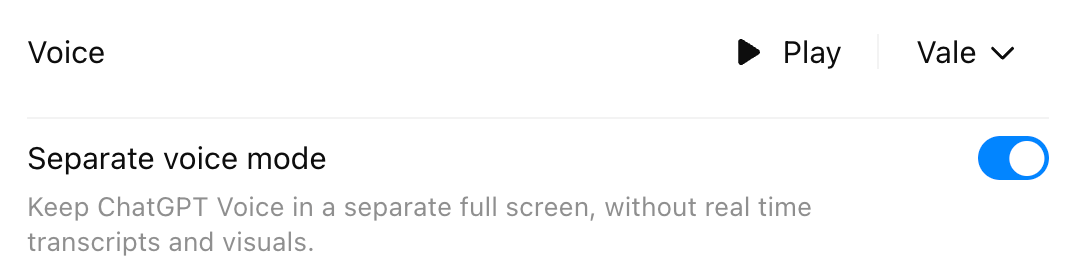
2. In Settings > General, toggle on “Separate voice mode.”
This will result in an isolated voice conversation with your digital colleague.
Prompting Best Practices & Use Cases
1. Think conversationally, not procedurally. Voice mode is optimized for back-and-forth. Short exchanges produce stronger, faster refinement than long monologues.
Example: “Wait, tell me more about that.” “Can you give me an example about X?"
2. Interrupt freely. Talking over the model or stopping it mid-response is part of the design. This results in fast corrections that prevent drift and accelerate clarity.
3. Lean into brainstorming; don’t self-edit. The model is built to capture and structure loose thinking. Let it handle coherence so you can stay in idea-generation mode.
4. Use voice mode as a role play partner to practice delivering speeches, training, or having a conversation.
Training Example: “I am going to rehearse my training session with you. I want you to act like a student and interrupt me when my explanations are not clear. Do not interrupt me otherwise, unless I explicitly ask for feedback. Ask questions only when I prompt you.”
Conversation Simulation Example: “I am going to have a difficult conversation with my boss about shifting part of my workload. My boss believes I’ve been handling everything well and doesn’t see the pressure building, but I feel at risk of burnout and need to renegotiate priorities. Please act like my boss so I can practice this discussion. Respond the way they realistically would, ask questions they might ask, and challenge me where my reasoning feels unclear. Only step out of character if I explicitly request feedback.”
5. Use voice mode as a coach
Communication coach example: “I want you to act as my communication coach while I rehearse an upcoming sales call. You are a seasoned communication strategist with deep experience in sales psychology, executive presence, and behavioral coaching. I’m going to walk through my opening, my discovery questions, and my close. Listen for pacing, clarity, and confidence. Interrupt only when I explicitly ask for coaching. After each section, give me a brief debrief: what landed, what could be tighter, and one concrete adjustment I should make.”
6. Use voice mode as a live translator
Example: “I’m going to speak in English, and I want you to translate everything I say into Spanish.”
Example: “You are going to hear a speech in Italian. When it is over, please translate it into English.”
7. Use voice mode as a thought partner. This is where personas come into play!
Example: Teacher Assistant (TA) Iris is saved to my managed memory. I can now begin any conversation with "Hi TA Iris! What do you think about..." The brainstorming will come from TA Iris's perspective.
Technical Details
Adaptive speech
The model adjusts to speaking speed, tone, and phrasing over the course of a session, resulting in more natural replies the longer the conversation continues.
Session recall memory
Within a single conversation, the model retains context across multiple turns. Names, goals, constraints, examples, and corrections persist.
Automatic language handling
Voice mode can detect and respond to multiple languages within the same session, switching seamlessly when you do.