

Groups
/
ChatGPT
/
navigation.content
ChatGPT Features & Capabilities
January 9, 2026 · Last updated on February 24, 2026

Text to Voice in ChatGPT

Text to Voice in ChatGPT
# How To Guide
# ChatGPT
# Text to Voice
# Features and Capabilities

The ins-and-outs of using voice-to-voice in ChatGPT
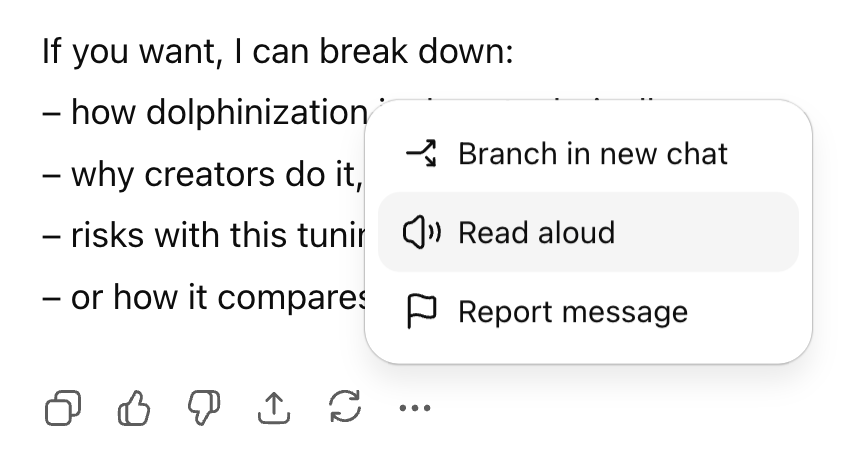
Text to Voice in ChatGPT
Text to voice turns written text into expressive, human-like speech and gives you the ability to hear a written output. 

How to use text to voice

To activate text to voice, select the … after the response you want to hear. Then choose “read aloud.”  


Technical Details

Voice Selection

The "Read aloud" feature uses the same voice as your overall system voice. If you would like to change how the voice sounds, go to "Settings" > "General" > "Voice," and select a new one.

Mobile App

The text to voice functions in the ChatGPT mobile app as well as the web interface.
Comments (0)
Popular
avatar

Sign in or Join the community
Don't Forget The Human Part!
LearnAIR
Create an account
Don't Forget The Human Part!
Table Of Contents
Dive in

Related

Resource
Voice to Text in ChatGPT
Jan 9th, 2026 Views 6
Resource
Apps in ChatGPT
Jan 14th, 2026 Views 12
Resource
Voice to Voice in ChatGPT
Jan 9th, 2026 Views 2
Resource
Projects in ChatGPT
Jan 14th, 2026 Views 8
Resource
Voice to Text in ChatGPT
Jan 9th, 2026 Views 6
Resource
Voice to Voice in ChatGPT
Jan 9th, 2026 Views 2
Resource
Projects in ChatGPT
Jan 14th, 2026 Views 8
Resource
Apps in ChatGPT
Jan 14th, 2026 Views 12
© 2026 LearnAIR
Terms of Service
Your Privacy Choices